Driver License
Description#
Driver License is a service for verifying whether a citizen of the Republic of Kazakhstan holds a valid driver's license, using their Individual Identification Number (IIN).
For convenient integration via the Backend API, please use Swagger (OpenAPI)
Terms#
- IIN - Individual Identification Number of a citizen of the Republic of Kazakhstan
- Subject - A person who is the object of a request to verify the existence of a driver's license
Stages:#
1. Obtaining the Organization's API-KEY#
The first step in using the technology is to obtain your organization's API-KEY. To get the API-KEY, log in to your Personal Account via this link. The API-KEY can be found in the Backend API Key field.
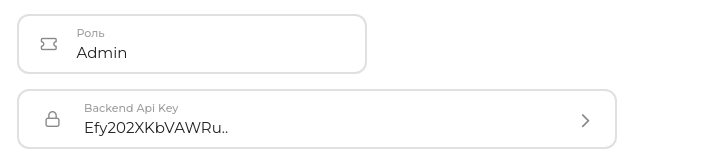
Example of an organization's API-KEY:
API-KEY: Efy202XKbVAWRu...
Note
For illustration purposes, a shortened API KEY is shown.
The actual length is 47 or more characters.
2. Sending a request to verify a driver's license#
Request data must be sent in JSON format.
Important
To use this service, you must have an active subscription. More information about subscriptions can be found here.
Request URL:
https://kyc.biometric.kz/api/v1/backend/driver-license/request/
| Request Format | Request Method |
|---|---|
| JSON | POST |
It is required to pass API KEY in the body of the request:
| Field Name | Type | Required | Description |
|---|---|---|---|
| api_key | String | Yes | API KEY of the organization in the personal account |
| iin | String | Yes | IIN of the subject |
Request examples:
import requests

url = 'https://kyc.biometric.kz/api/v1/backend/driver-license/request/'

headers = {
    'Accept': 'application/json',
    'Content-Type': 'application/json',
}

data = {
    'api_key': '<organization_api_key>',
    'iin': '<subjects_iin>',
}

response = requests.post(url, headers=headers, json=data)

print(response.json())
const url = 'https://kyc.biometric.kz/api/v1/backend/driver-license/request/';

const apiKey = '<organization_api_key>';

const headers = {
    'Accept': 'application/json',
    'Content-Type': 'application/json'
};

const data = {
    api_key: apiKey,
    iin: '<subjects_iin>',
};

fetch(url, {
    method: 'POST',
    headers: headers,
    body: JSON.stringify(data)
})
.then(response => response.json())
.then(data => console.log(data))
.catch(error => console.error(error));
The response will be a JSON object with the following fields:
- backend_session_id - Backend session identifier
- status - Request processing status (default:
PENDING) - iin - IIN of the subject
- result - Result of the driver's license verification (
true/false/null)
Note
Possible values for the status field:
PENDING— request is being processedVALID— driver's license foundINVALID— driver's license not foundFAILED— error occurred while processing the request
Response example:
{
  "backend_session_id": "9e2d5632-df64-4a1f-9b6c-d7d2ad79742f",
  "status": "VALID",
  "iin": "950215301234",
  "result": true
}
Possible Errors#
| Status Code | Response | Description |
|---|---|---|
| 400 | Subscription has not started | Subscription has not yet been activated |
| 400 | No active or future subscription for technology | No active or upcoming subscription for the technology |
| 400 | Client does not have subscription | The client has no subscription. More information about subscriptions can be found here |
| 400 | Client does not have access to Driver License technology | The client does not have access to the technology. Reasons: no subscription, subscription expired, or technology is inactive |
| 404 | Organization not found | Organization not found for the provided API key |
| 503 | Driver License service is not available now | The Driver License service is currently unavailable |