MRZ
Description#
MRZ - technology which allows to parse MRZ strings from a document. At the moment it only works with ID cards of citizens of Kyrgyzstan.
For convenient integration through Backend API, use Swagger (OpenAPI)
Terms#
- MRZ - is a special area at the bottom of passports, visas, and ID cards, consisting of two or three lines of text. It contains the holder’s key information (last name, first name, document number, date of birth, nationality).
Stages:#
1. Obtaining the Organization's API-KEY#
The first step in using the technology is to obtain your organization's API-KEY. To get the API-KEY, log in to your Personal Account via this link. The API-KEY can be found in the Backend API Key field.
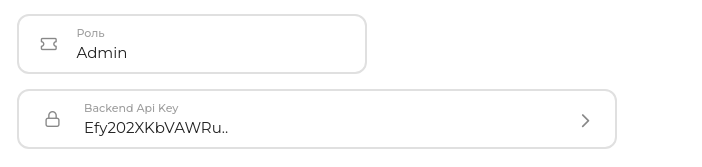
Example of an organization's API-KEY:
API-KEY: Efy202XKbVAWRu...
Note
For illustration purposes, a shortened API KEY is shown.
The actual length is 47 or more characters.
2. Sending a request to parse MRZ lines from a document#
When sending a request to parse MRZ lines, the data must be sent in Form Data.
Important
To use this service, you must have an active subscription. More information about subscriptions can be found here.
Request URL:
https://kyc.biometric.kz/api/v1/backend/erd/retrieve/
| Request Format | Request Method |
|---|---|
| JSON | POST |
It is required to pass API KEY in the body of the request:
| Field Name | Type | Required | Description |
|---|---|---|---|
| api_key | String | Да | API KEY of organization in the personal account |
| personal_number | String | Да | IIN / Personal Number of the subject |
Request examples:
    import requests

    url = 'https://kyc.biometric.kz/api/v1/backend/mrz/retrieve/'

    headers = {
        'Accept': 'application/json',
    }

    files = {
        'image': open('/path/to/your/image.jpg', 'rb'),
    }

    data = {
        'api_key': '<organization_api_key>',
    }

    response = requests.post(
        url,
        headers=headers,
        data=data,
        files=files,
    )

    print(response.json())
    import fs from 'fs';
    import FormData from 'form-data';
    import fetch from 'node-fetch';

    const url = 'https://kyc.biometric.kz/api/v1/backend/mrz/retrieve/';
    const apiKey = '<organization_api_key>';

    const form = new FormData();
    form.append('api_key', apiKey);
    form.append('image', fs.createReadStream('/path/to/your/image.jpg'));

    fetch(url, {
        method: 'POST',
        headers: {
            'Accept': 'application/json',
            ...form.getHeaders(),
        },
        body: form
    })
    .then(res => res.json())
    .then(data => console.log(data))
    .catch(err => console.error(err));
The response will be a JSON object with the following fields:
- backend_session_id - session UUID
- status - session status (CREATED, FAILED и т.д.)
- result - result flag
- mrz_string - parsed MRZ lines
- failure_reason - reason for the technology failure (in case of one)
Response example:
{
  "backend_session": "00000000-0000-0000-0000-000000000000",
  "status": "RECEIVED",
  "result": true,
  "mrz_string": "IDKAZ0123456789012345678901<<<\n0123456F0123456KAZ<<<<<<<<<<<0\nJHON<<DOE<<<<<<<<<<<<<<<<<<<<<",
  "failure_reason": null
}
Possible Errors#
| Code | Response | Description |
|---|---|---|
| 400 | Subscription has not started | Subscription has not yet started |
| 400 | No active or future subscription for technology | No active or upcoming subscription for the technology |
| 400 | Client does not have subscription | The client has no subscription. Read more — here |
| 400 | Client does not have access to MRZ technology | Client does not have access to MRZ technology |
| 400 | MRZ max attempts exceeded | End client exceeded max attempts |
| 422 | Error while parsing MRZ | An error occured while parsing MRZ lines |
| 503 | MRZ service not available now | MRZ service not available now |